

Mouse Typing Made Easy
Method 1:
The On-Screen Keyboard in Windows 10 allows you to type with just your mouse.Step 1
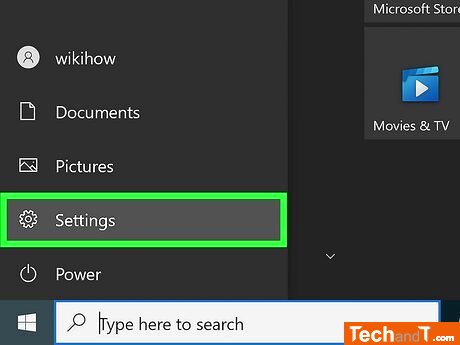
To open Settings, press the key combination Win + I, or click the Windows logo to open the Start menu and then select the gear icon.
Step 2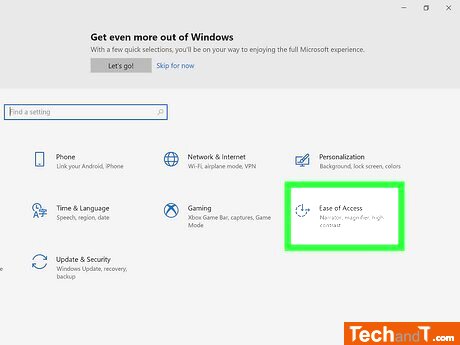
Choose the Ease of Access option located near the dash-circled clock icon.
Book a service online
adverts from google ads will be here
Step 3
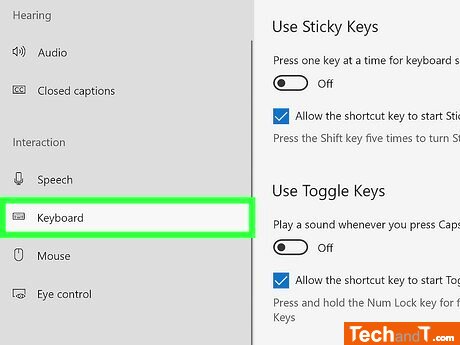
To locate the Keyboard, go to the Interaction panel on the left and click it.
Step 4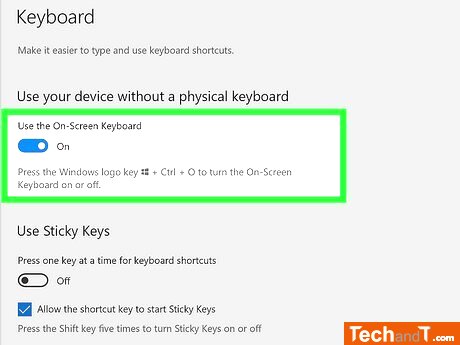
To enable the On-Screen Keyboard feature, click the switch beside it. To turn off and on, press Win + Ctrl + O. To modify its options, press the Options key.
TimeScale:
Approx. Time Required: 8 Minutes