

Install BIOS Update Using USB
Method 1:
Getting the BIOS Update by downloading it.Step 1
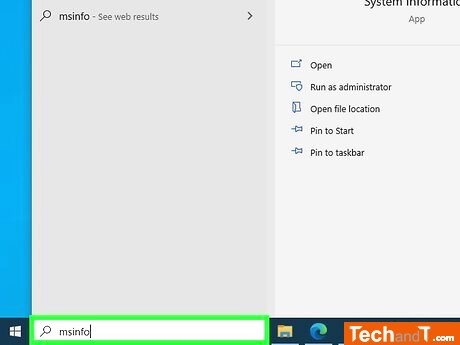
Press the Windows key, search for msinfo and click the result of the system app. Open the app and take a look at your computer's specifications, particularly the BaseBoard Product which is your motherboard model, together with the brand of the motherboard and the BIOS Version/Date.
Step 2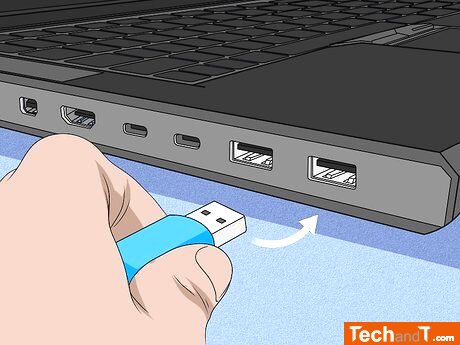
For a desktop computer with a tower, the USB ports can be found both at the front and back of the unit; for an all-in-one desktop model, you will likely find the USB ports located at the back of the monitor; a laptop computer is equipped with USB ports on the sides. To connect the USB, place it in one of the designated USB ports.
Book a service online
Step 3
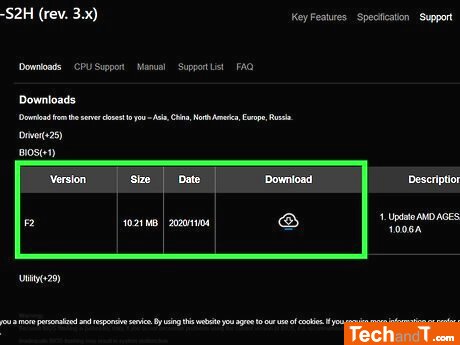
To find the BIOS update for your motherboard, use a search engine (e.g. Google) and save the file to your USB drive, making sure to select the USB stick as the download destination. If the BIOS update does not automatically save to the USB device, you will need to manually move the file to the USB.
TimeScale:
Approx. Time Required: 6 Minutes